Compare tools for your creator workflow

Use this research prompt to check official sources, plan limits, and workflow fit. Review the cited evidence before acting on an AI answer.

Clean share URL: https://viralworx.ai/compare

QR code linking to https://viralworx.ai/compare

Scan to open https://viralworx.ai/compare

See which tools cover the whole creator workflow.

Compare the jobs solo creators and small teams repeat every week: plan, create, schedule, analyze, and improve. Check each tool against your accounts and required handoffs.

  • Side-by-side answers by creator job
  • Official source links and review date included
  • Clear fit notes for specialists, schedulers, and Viral Worx
View Viral Worx pricing
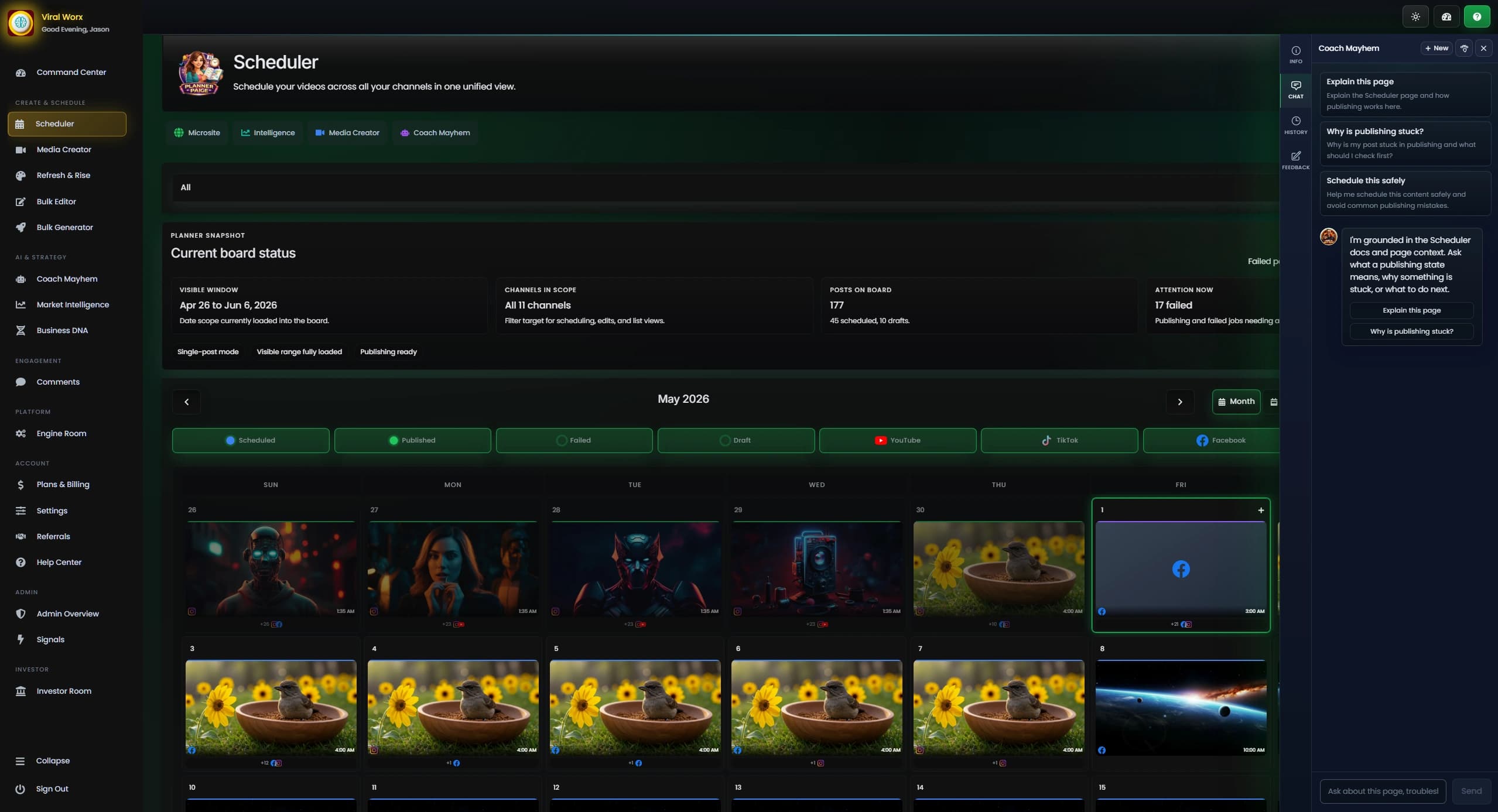
Viral Worx Scheduler calendar showing planned social media posts across platforms
Primary fit
Multi-channel creator workflowPlan, create, schedule, and review content with tools available on your plan.
Depth signal
Signal-to-content handoffMarket Intelligence can move into Coach, Scheduler, Bulk Creator, and Media Creator.
Evidence check
Vendor pages and plan limitsOfficial descriptions reviewed September 7, 2026; no comparative product trial.

Different tools are good at different things.

The summaries below describe vendor-listed functions. Best-for notes are Viral Worx's editorial assessment of where to start evaluating; they do not establish a universal winner or exclude other uses.

Viral Worx

Connected creator workflow

Free, Pro, Enterprise

Command Center analytics, Coach Martocci, scheduling, bulk tools, and Enterprise production workflows with plan-specific access.

Our fit assessment
Solo and small-team creators evaluating a connected planning, creation, publishing, and review process.
Watch for
Coach and Scheduler require Pro or above; Media Creator and AI Bulk Generator require Enterprise.

TubeBuddy

YouTube optimization toolkit

Pro, Legend, Enterprise

The official feature list covers YouTube search, titles, thumbnails, analytics, scheduled updates, and bulk editing.

Our fit assessment
Creators whose immediate work is YouTube packaging and catalog maintenance.
Watch for
Check each tool's plan limits and the creator-license terms for your channel or business.

vidIQ

YouTube research and AI tools

Free, Boost, Max, Enterprise

Plans describe topic research, AI Coach, thumbnail tools, and Max clipping and generation. Enterprise includes team roles.

Our fit assessment
Creators evaluating idea research, YouTube guidance, and AI-assisted production.
Watch for
Check AI credits, account support, and team access for the plan you are considering.

Hootsuite

Social media management

Standard and Advanced reviewed

Standard describes scheduling, analytics, an inbox, and AI content tools. Advanced adds approval workflows and team collaboration.

Our fit assessment
Teams evaluating shared publishing, social inbox work, and content review.
Watch for
Check the required networks, approval workflow, and listening limits against the selected plan.

See what each Viral Worx tool does and what the other brands cover.

Match each Viral Worx tool to related functions described in the official sources below. Similar functions may differ in plan access, supported accounts, and manual steps. Not verified means the sources did not establish coverage.

Command Center

Viral Worx
Command Center analytics on Free and above
TubeBuddy
YouTube analytics and channel reports
vidIQ
Channel insights; Enterprise cross-channel reporting
Hootsuite
Social analytics and reporting

Market Intelligence

Viral Worx
Enterprise topics, competitors, in-app alerts, and workflow handoffs
TubeBuddy
Topical analysis and competitor tools
vidIQ
Trends research and competitive intelligence
Hootsuite
Listening and competitor benchmarking

Coach Martocci

Viral Worx
Coach Martocci on Pro and above
TubeBuddy
Title generation and video idea tools
vidIQ
AI Coach with plan-specific access
Hootsuite
AI ideas, captions, and images

Scheduler

Viral Worx
Scheduler on Pro and above; publishing depends on account permissions
TubeBuddy
Scheduled Publish and Scheduled Video Update listed
vidIQ
Not verified in the reviewed sources
Hootsuite
Content calendar and scheduled publishing

Bulk Editor

Viral Worx
Bulk metadata editor on Pro and above
TubeBuddy
Bulk find, replace, and append tools
vidIQ
Not verified in the reviewed sources
Hootsuite
Bulk scheduling on Advanced; metadata editing not verified

AI Bulk Generator

Viral Worx
AI Bulk Generator on Enterprise
TubeBuddy
Not verified in the reviewed sources
vidIQ
Max lists clipping and generation; batch workflow not verified
Hootsuite
AI content creation; equivalent batch workflow not verified

Media Creator

Viral Worx
Media Creator on Enterprise; Coach transfers also require Enterprise
TubeBuddy
Thumbnail generation and Suggested Shorts listed
vidIQ
Thumbnail tools; Max clipping and generation
Hootsuite
AI images and content libraries

Microsites

Viral Worx
Hosted microsite and creator portal visibility on Free and above
TubeBuddy
Not verified in the reviewed sources
vidIQ
Not verified in the reviewed sources
Hootsuite
Link-in-bio tool; equivalent hosted microsite not verified

Referrals

Viral Worx
Referral program; see the linked Viral Worx terms
TubeBuddy
Not verified in the reviewed sources
vidIQ
Not verified in the reviewed sources
Hootsuite
Not verified in the reviewed sources

Enterprise controls

Viral Worx
Enterprise team roles, approvals, and audit trail
TubeBuddy
Enterprise channel and user access
vidIQ
Enterprise roles and permissions
Hootsuite
Advanced approvals and internal collaboration

Start with the job you need the tool to do every week.

Define the required work before comparing tools. Use the creator workflow comparison guide to plan a draft-to-review pilot.

Evaluate Viral Worx when

You want to develop content with Coach, prepare scheduled posts, and review channel analytics in one workspace. Check Pro and Enterprise gates against your required work.

Evaluate YouTube tools when

Your immediate task is topic research, title and thumbnail work, or catalog updates. Test TubeBuddy or vidIQ against that task and the channel access you need.

Evaluate Hootsuite when

Your team needs shared publishing, inbox management, or formal content review. Its Standard and Advanced pages describe these workflows with different plan limits.

Side-by-side answers to the biggest creator workflow questions.

This table repeats the documented coverage for a quick check. Similar labels do not prove equivalent behavior; verify the relevant plan and account before choosing.

On narrow screens, the feature comparison table scrolls horizontally.

Feature comparison across Viral Worx and common competitor tools
Creator job
Connected creator workflow
Viral Worx
Our product
Free, Pro, Enterprise
YouTube optimization toolkit
TubeBuddy
Pro, Legend, Enterprise
YouTube research and AI tools
vidIQ
Free, Boost, Max, Enterprise
Social media management
Hootsuite
Standard and Advanced reviewed
Public plans reviewed
Free, Pro, Enterprise
Pro, Legend, Enterprise
Free, Boost, Max, Enterprise
Standard and Advanced
Command Center
Command Center analytics on Free and above
YouTube analytics and channel reports
Channel insights; Enterprise cross-channel reporting
Social analytics and reporting
Market Intelligence
Enterprise topics, competitors, in-app alerts, and workflow handoffs
Topical analysis and competitor tools
Trends research and competitive intelligence
Listening and competitor benchmarking
Coach Martocci
Coach Martocci on Pro and above
Title generation and video idea tools
AI Coach with plan-specific access
AI ideas, captions, and images
Scheduler
Scheduler on Pro and above; publishing depends on account permissions
Scheduled Publish and Scheduled Video Update listed
Not verified in the reviewed sources
Content calendar and scheduled publishing
Bulk Editor
Bulk metadata editor on Pro and above
Bulk find, replace, and append tools
Not verified in the reviewed sources
Bulk scheduling on Advanced; metadata editing not verified
AI Bulk Generator
AI Bulk Generator on Enterprise
Not verified in the reviewed sources
Max lists clipping and generation; batch workflow not verified
AI content creation; equivalent batch workflow not verified
Media Creator and AI asset production
Media Creator on Enterprise; Coach transfers also require Enterprise
Thumbnail generation and Suggested Shorts listed
Thumbnail tools; Max clipping and generation
AI images and content libraries
Microsites
Hosted microsite and creator portal visibility on Free and above
Not verified in the reviewed sources
Link-in-bio tool; equivalent hosted microsite not verified
Referrals
Referral program; see the linked Viral Worx terms
Not verified in the reviewed sources
Enterprise controls
Enterprise team roles, approvals, and audit trail
Enterprise channel and user access
Enterprise roles and permissions
Advanced approvals and internal collaboration

Official pages used for this comparison.

Last reviewed September 7, 2026. Vendor facts come from the official pages below. We have not independently tested these products against one another. Fit notes are Viral Worx's editorial assessment, not vendor claims or measured results.

To reproduce the comparison, list your required accounts, formats, drafting tasks, approvals, and reporting needs. Open the relevant vendor page, record the named feature and plan, and mark anything the source does not establish as not verified. Then try the same draft with your own assets in each candidate, recording manual steps and unmet requirements. No numeric scores or rankings are assigned.

Try the workspace against your next content plan.

Free includes Command Center analytics and a connected channel. Pro adds Coach and scheduling; Enterprise adds Media Creator, bulk generation, and team controls.

Quick answers for people comparing tools.

This short FAQ helps visitors and search systems understand what the compare page is meant to answer.

How should I compare Viral Worx with other creator tools?

Start with your required accounts, formats, drafting tasks, review handoffs, and reporting needs. Check the linked official pages for plan limits, then try a draft workflow with your own content before switching.

Was this comparison independently tested?

No. Viral Worx publishes this editorial comparison using official vendor pages and its own product documentation. Feature descriptions are not measured reliability, growth, or productivity results. Fit notes are our assessment.

Does a missing feature mean a competitor does not offer it?

No. Not verified means the reviewed sources did not establish the requirement. Ask the vendor or test the relevant plan before treating it as unavailable. Products can offer other features beyond this comparison.